
Wccftech journalists ran the PC version of Phantom Blade Zero through the settings and found parameters that, when reduced, almost did not affect the picture.According to their measurements, at 1440p resolution, the optimized preset produces almost 40% more frames per second than the Ultra preset.On Russian Steam the game costs 3999 ₽, it has Russian language.The first reviews of the project we sorted it out before.
Settings for reduction
With Ultra it is worth reducing the quality of shadows, lighting, effects and materials, as well as the drawing distance and detail of the environment.The most noticeable result is obtained by disabling the High-Quality Hair option, that is, the high quality of the characters' hair.
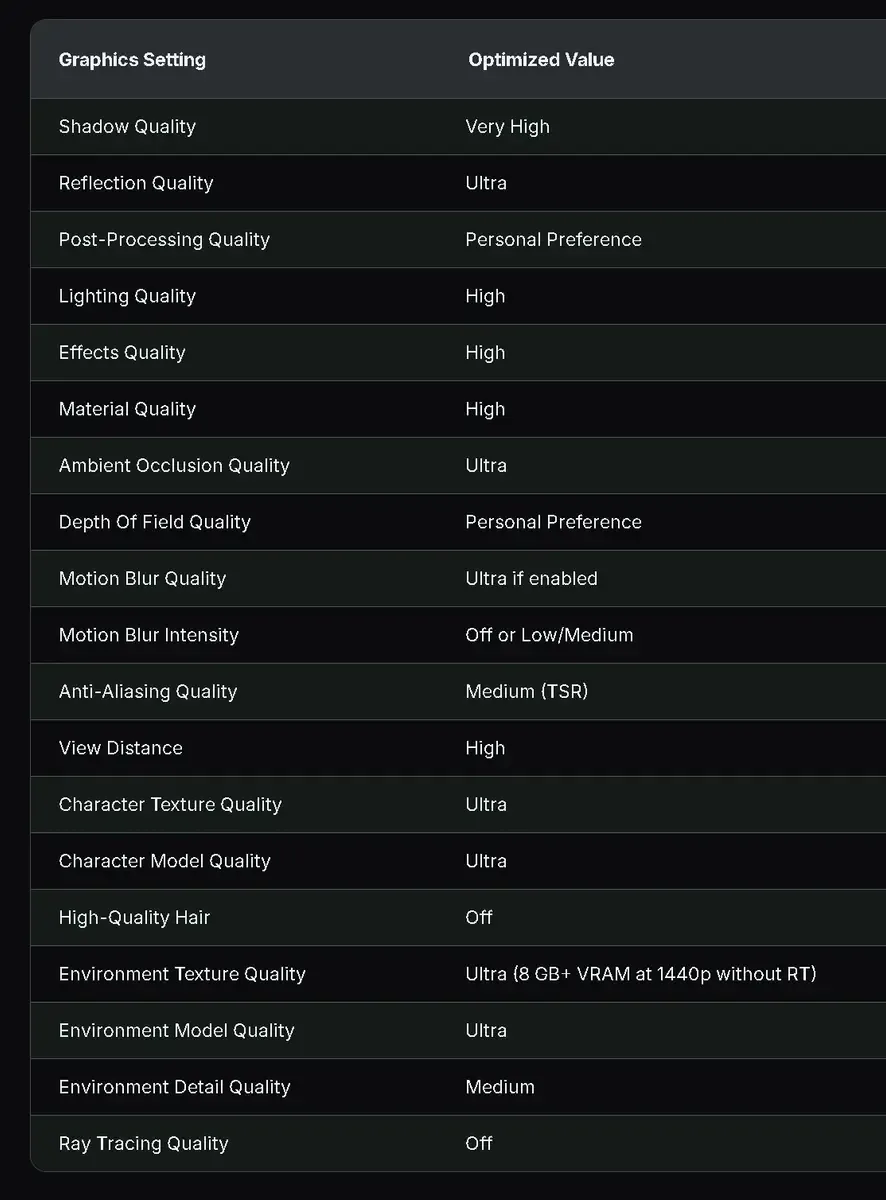
Options for maintaining quality
Reflections, Ambient Occlusion, textures, character models and environment models are best left on Ultra.Reducing these points does not give a noticeable increase, but worsens the picture.
Blur due to scale
Blogger Daniel Owen drew attention to another feature.When choosing 1440p, the game defaults to Super Resolution Output Scale at 85%, which means it actually renders the image below the stated resolution.On a PC with an RTX 3060, Owen got around 70 FPS with DLSS Performance and 100% scale.With DLSS Quality it was about 60 FPS, but the picture became noticeably sharper.The tests were run with ray tracing turned off: the game has high-quality static lighting.
Sign in or create an account to leave a comment.
Be the first to share your thoughts.